Best Wireless CarPlay Adapter
As an Amazon Associate, I earn from qualifying purchases. Some links may earn us a commission at no extra cost to you.
A wireless CarPlay adapter removes the need to connect an iPhone every time you enter the car. Once paired, the adapter communicates with the phone through Bluetooth and Wi-Fi, allowing compatible factory controls, navigation, calls, music, messages, and voice commands to work without a cable. These adapters do not add CarPlay to a vehicle that lacks it. The car must already support factory wired CarPlay. Models that also support Android Auto generally require factory wired Android Auto for Android phones. Compatibility can still vary by vehicle, infotainment system, USB port, phone, and firmware version, so checking the manufacturer’s compatibility guidance before buying is essential.
Connection time is also not identical in every car. The adapter must wait for the vehicle’s USB port and infotainment system to start before it can reconnect to the phone. Manufacturer connection-speed claims should therefore be treated as best-case figures rather than guaranteed results.
Top Picks
1. Ottocast Mini Nova — Best Compact Wireless CarPlay Adapter
The Ottocast Mini Nova converts compatible wired CarPlay and wired Android Auto systems into wireless connections. Its small direct-plug body occupies less space than adapters that require a separate cable, making it useful in vehicles with exposed USB ports or limited console storage.
After the first pairing, the Mini Nova remembers the connected phone and attempts to reconnect when the vehicle starts. It also supports firmware-over-the-air updates, retains compatible factory controls, and includes a USB-A-to-USB-C adapter for different port types.
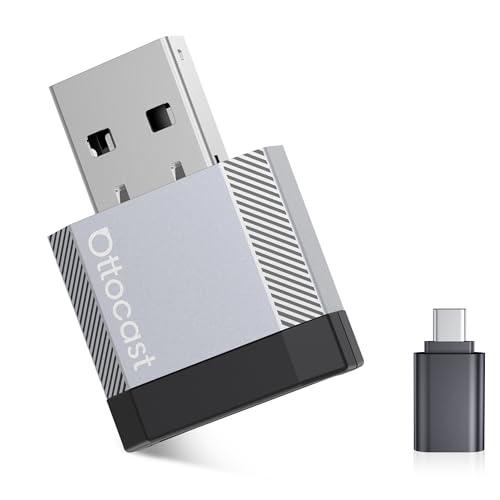
- 【Compatibility Check — Right for My Car?】Ottocast wireless carplay adapter is designed only for vehicles equipped with factory wired CarPlay or...
- 【Efficient Heat Dissipation for Long Drives】Compared with standard plastic housings, the aluminum alloy shell helps dissipate heat more...
- 【Easy to Use, No Repeated Setup Needed】With a plug-and-play design, the Ottocast Mini Nova adapter remembers your phone after the initial pairing...
- 【Slim and Mini Design】Unlike the bulky box-style adapters commonly found on the market, Ottocast mini adapter features a thinner, flatter body...
Pros
-
Supports both wireless CarPlay and Android Auto
-
Compact direct-plug body reduces cable clutter
-
Automatically reconnects after the initial pairing
-
Firmware updates can address compatibility issues
Cons
-
Requires factory wired CarPlay or wired Android Auto
-
Direct-plug shape may obstruct closely spaced USB ports
Who should buy it: Choose the Mini Nova if you want a small dual-platform adapter that can remain connected without leaving a loose cable in the center console.
Scores: Performance 4.5/5 · Connection and Controls 4/5 · Compatibility 4/5 · Value 4/5
2. Ottocast Mini Cube 3.0 — Best Overall for Mixed-Phone Households
The Ottocast Mini Cube 3.0 supports wireless CarPlay for compatible iPhones and wireless Android Auto for supported Android phones. That makes it a practical choice for households in which different drivers use different phone platforms.
Its right-angle connector keeps the adapter close to the USB port instead of leaving it suspended from a cable. The Mini Cube remembers previously paired devices, automatically reconnects when the vehicle starts, and supports firmware-over-the-air updates for bug fixes and compatibility improvements.
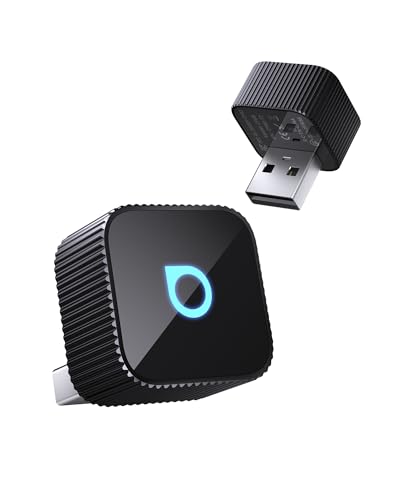
- 【Wireless Freedom for Every Drive】Transform your wired CarPlay/Android Auto into wireless with Ottocast Mini 2025. No more tangled cables—just...
- 【Lightning-Fast Connection on the Go】Powered by 5GHz WiFi + Bluetooth 4.2 + next-gen chip, this wireless CarPlay adapter connects in 10 seconds...
- 【Plug & Play Simplicity, Zero Hassle】Setup takes just 3 steps: Plug in → Enable Bluetooth/WiFi → Pair your phone. That’s it—no apps or...
- 【Compact, Durable & Road-Ready】50% smaller than typical adapters, the Ottocast wireless CarPlay adapter 2025 blends into any car interior without...
Pros
-
Works with compatible iPhones and Android phones
-
Right-angle design creates a neat installation
-
Automatically reconnects to a previously paired device
-
FOTA support allows future firmware improvements
Cons
-
Switching between multiple saved phones may require manual intervention
-
Not compatible with every factory or aftermarket head unit
Who should buy it: The Mini Cube 3.0 is the strongest all-around choice for families who share a vehicle and need both wireless CarPlay and Android Auto support.
Scores: Performance 4.5/5 · Connection and Controls 4.5/5 · Compatibility 4.5/5 · Value 4.5/5
3. Ottocast U2-Air — Best iPhone-Only Adapter
The Ottocast U2-Air is a focused option for drivers who only need wireless Apple CarPlay. It uses Bluetooth for initial communication and 5GHz Wi-Fi for the active CarPlay connection, allowing compatible navigation, music, messages, calls, Siri, and factory controls to function without repeatedly connecting an iPhone by cable.
The U2-Air automatically reconnects after the first setup and supports software updates. Because it does not include Android Auto, its interface and setup are more focused than those of dual-platform adapters. Actual startup speed depends on the vehicle’s infotainment and USB initialization time.

- 【 Fastest Mini Wireless CarPlay Dongle 】OTTOCAST U2-AIR Wireless Apple CarPlay Adapter is the latest official version in 2024, it can quickly...
- 【 Fully Automated Driving life 】After the first installation, U2-Air will automatically start and quickly connect to your iPhone when the car...
- 【 Plug and Play - No Audio Delay 】Plug and play design, suitable for all motorists. The high-end configuration makes the audio basically lag-free...
- 【 U2-AIR 3.0 Compatible Models 】This CarPlay Wireless Adapter Only compatible with cars that have factory wired CarPlay, model year...
Pros
-
Designed specifically for wireless Apple CarPlay
-
Uses 5GHz Wi-Fi for the active connection
-
Automatically reconnects after initial setup
-
Maintains compatible factory buttons and controls
Cons
-
Does not support Android Auto
-
Separate adapter body and cable create more clutter than direct-plug models
Who should buy it: Choose the U2-Air if everyone using the vehicle has an iPhone and you prefer an established CarPlay-only model over a dual-platform adapter.
Scores: Performance 4/5 · Connection and Controls 4/5 · Compatibility 3.5/5 · Value 4.5/5
4. Carlinkit Mini Ultra — Best Low-Profile Dual-Platform Adapter
The Carlinkit Mini Ultra converts compatible wired CarPlay and Android Auto systems to wireless operation. Its body is smaller than a typical USB flash drive, making it a good option for center consoles where there is little room for a full-size adapter and cable.
Carlinkit equips the Mini Ultra with 5.8GHz Wi-Fi and Bluetooth 5.4. It includes a USB-C adapter, automatically reconnects to previously paired phones, and provides access to firmware settings through a local browser page. Updates must be checked and installed manually rather than occurring without user involvement.

- 1. Seamless Wireless Upgrade Instantly convert your factory wired CarPlay/Android Auto to wireless with this compact adapter. Simply plug it into your...
- 2. Factory Integration Designed to work seamlessly with your car's original systems, this adapter maintains all OEM functionality. Keep using your...
- 3. Universal Compatibility Works with most vehicles featuring factory wired CarPlay/Android Auto via USB-A or USB-C ports. Supports iPhone 6 and later...
- 4. Smart & Compact Design The ultra-small adapter (just 32.85×20×6.55mm) fits discreetly in your car without getting in the way. Features low 0.75W...
Pros
-
Supports wireless CarPlay and Android Auto
-
Small body fits neatly into crowded consoles
-
Includes support for USB-A and USB-C ports
-
Local settings page provides firmware and troubleshooting controls
Cons
-
Firmware updates require connecting to the adapter’s settings page
-
Manufacturer excludes some vehicles, including certain BMW systems
Who should buy it: The Mini Ultra suits drivers who want dual-platform support in the smallest practical format and do not mind using a browser-based settings page when troubleshooting.
Scores: Performance 4/5 · Connection and Controls 4/5 · Compatibility 4/5 · Value 4.5/5
5. Enhanlife Wireless CarPlay Adapter — Best Budget Direct-Plug Option
The Enhanlife adapter is a lower-cost option for converting factory wired Apple CarPlay into a wireless connection. Its direct-plug design connects to the vehicle without a long external cable, helping reduce clutter around the infotainment USB port.
The adapter is intended for iPhones and includes USB-A and USB-C connectivity for different vehicle ports. It automatically attempts to reconnect after the initial setup, but connection time and stability depend on the vehicle, phone, USB power behavior, and surrounding wireless interference.
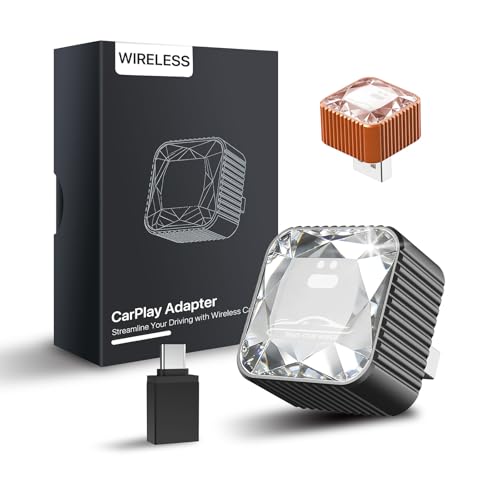
- 2026 Premium Glass Finish Design – Stand Out in Your Car - Unlike ordinary plastic adapters, this wireless CarPlay adapter features a premium glass...
- 5-Second Fast Auto-Connect & Seamless Experience - Enjoy wireless Apple CarPlay in as fast as 5 seconds. Once paired, your iPhone automatically...
- True Plug & Play – No App, No Complicated Setup - Simply plug the adapter into your car’s USB/USB-C CarPlay port, turn on Bluetooth and Wi-Fi, and...
- Designed for Factory Wired Apple CarPlay Vehicles - Compatible with vehicles that already support factory wired Apple CarPlay. Works with iPhone 6 and...
Pros
-
Direct-plug design keeps the installation compact
-
Supports both USB-A and USB-C vehicle ports
-
Automatically reconnects after initial pairing
-
Provides a low-cost route to wireless CarPlay
Cons
-
Does not provide wireless Android Auto
-
Less established support ecosystem than Ottocast or Carlinkit
Who should buy it: Choose the Enhanlife if price and a clean direct-plug installation matter more than dual-platform support or an extensive manufacturer support network.
Scores: Performance 3.5/5 · Connection and Controls 3.5/5 · Compatibility 3.5/5 · Value 5/5
6. Carlinkit FireDrive Link Pro — Best for HDMI and Passenger Entertainment
The FireDrive Link Pro goes beyond standard wireless adapters. It converts compatible factory wired CarPlay to wireless CarPlay or Android Auto and adds an HDMI input designed for devices such as an Amazon Fire TV Stick.
The HDMI source is controlled with its own remote or a compatible Bluetooth controller rather than through the vehicle’s touchscreen. It also requires factory wired CarPlay and may need additional power for the connected streaming device. Video should only be used while the vehicle is parked or by passengers where local law permits it.
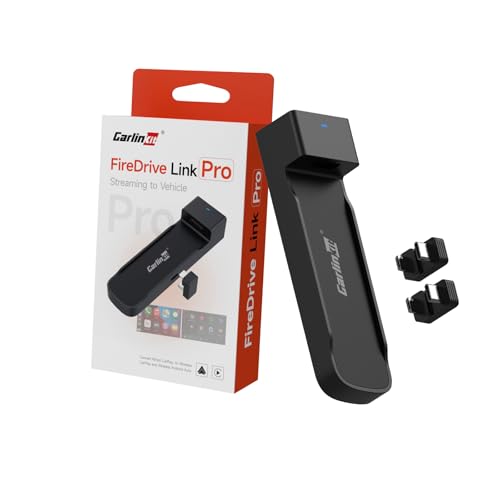
- FireDrive Integration: Compatible with Fire TV Stick through HDMI connection for enhanced in-car entertainment. Project videos or game images onto the...
- Display Conversion: Functions as a car TV converter enabling HDMI input for various multimedia content. Perfectly displays 2K HD high-quality and...
- Wireless Connectivity: Transform your wired CarPlay vehicle into wireless CarPlay and Android Auto capability with CarlinKit FireDrive Link Pro.
- Plug and Play: 1. Connect the longer end of the Carlinkit Car TV HDMI Adapter Y-type data cable to your car's power supply and the shorter end to your...
Pros
-
Adds wireless CarPlay and Android Auto support
-
HDMI input supports compatible streaming devices
-
Provides a distinctive upgrade for parked entertainment
-
Includes USB-A and USB-C connection accessories
Cons
-
More complicated to install than a basic wireless adapter
-
HDMI content cannot be controlled through the car touchscreen
Who should buy it: The FireDrive Link Pro is for drivers who want wireless phone integration plus HDMI entertainment for passengers, road-trip stops, charging breaks, or use while parked.
Scores: Performance 4/5 · Connection and Controls 3.5/5 · Compatibility 3.5/5 · Value 3.5/5
Quick Comparison
-
Best compact adapter: Ottocast Mini Nova
-
Best overall for iPhone and Android households: Ottocast Mini Cube 3.0
-
Best iPhone-only adapter: Ottocast U2-Air
-
Best low-profile dual-platform adapter: Carlinkit Mini Ultra
-
Best budget direct-plug option: Enhanlife Wireless CarPlay Adapter
-
Best for HDMI and passenger entertainment: Carlinkit FireDrive Link Pro
Buying Guide
Confirm That the Vehicle Has Wired CarPlay
Connect the iPhone to the vehicle with a data-capable USB cable. If CarPlay appears on the factory screen, a wireless adapter may work. If the vehicle only supports Bluetooth calls or music, plugging in an adapter will not add CarPlay.
Check Android Auto Separately
A product described as two-in-one does not guarantee Android Auto compatibility in every wired-CarPlay vehicle. For the most reliable Android operation, the vehicle should already support factory wired Android Auto and the phone should meet the adapter’s operating-system requirements.
Choose Between Direct-Plug and Cable Designs
Direct-plug adapters create a cleaner installation and occupy less space. A short-cable adapter is easier to move, position, or secure inside a covered console. Direct-plug models may obstruct a neighboring USB port if the ports are placed close together.
Expect Some Wireless Delay
Wireless CarPlay uses Bluetooth and Wi-Fi, so it can have slightly more delay than a direct cable. The difference is usually most noticeable when changing songs, making rapid touchscreen inputs, or switching between applications. Navigation position and audio should still remain usable when the connection is stable.
Look for Accessible Firmware Updates
Firmware updates can improve compatibility, but they should not be installed unnecessarily. Updating a working adapter can sometimes introduce new problems. Record the current version first, follow the manufacturer’s instructions, and avoid switching off the vehicle during an update.
FAQs
Will a Wireless CarPlay Adapter Work in Any Car?
No. The vehicle must already have functioning wired Apple CarPlay. Compatibility can also depend on the head unit, USB port, firmware, phone, and whether the system is factory-installed or aftermarket.
Does the Phone Connect Through Bluetooth or Wi-Fi?
Bluetooth is normally used during initial pairing and reconnection. The adapter then creates a Wi-Fi connection for the higher-bandwidth CarPlay interface, navigation data, audio, and controls.
Can Two Phones Be Paired With One Adapter?
Many adapters can remember more than one phone, but they generally connect to only one at a time. When both phones are nearby, the adapter may reconnect to the last-used device. Switching drivers can require disconnecting one phone or manually selecting the other.
Will Steering-Wheel Controls Still Work?
Compatible factory controls generally continue working because the adapter passes CarPlay through the existing infotainment system. Voice buttons, track controls, knobs, and touchscreens can vary by vehicle, so full control compatibility is not guaranteed.
Does Wireless CarPlay Drain the Phone Battery?
Yes. Continuous Wi-Fi, Bluetooth, navigation, music, and screen activity consume battery power. On longer drives, a wireless charging pad or separate charging cable may still be useful even when CarPlay itself is wireless.
Can These Adapters Play Netflix or YouTube?
Basic CarPlay adapters do not unlock video streaming because Apple CarPlay restricts video applications. A specialized HDMI device such as the FireDrive Link Pro can display a separate video source, but it should only be used safely while parked or by passengers where legally allowed.
Final Verdict
The Ottocast Mini Nova is the best compact choice for drivers who want both wireless CarPlay and Android Auto in a clean direct-plug format. The Mini Cube 3.0 is the stronger option for households that regularly switch between iPhone and Android users, while the U2-Air remains a straightforward choice for iPhone-only vehicles.
Carlinkit’s Mini Ultra offers similar dual-platform functionality in a particularly small body, and the Enhanlife provides a simpler budget option for Apple users. The FireDrive Link Pro is the specialized choice for buyers who need wireless phone integration and an HDMI input for safe passenger or parked entertainment.
As an Amazon Associate, I earn from qualifying purchases.