Best Handheld Consoles for Retro Games
As an Amazon Associate, I earn from qualifying purchases. Some links may earn us a commission at no extra cost to you.
Retro handhelds range from powerful Android devices capable of handling more demanding emulation to compact Linux systems focused on classic console libraries. The right choice depends on the systems you want to play, screen size, control layout, portability, and how much setup you are comfortable doing.
Top Picks
Anbernic RG557 — Best for Overall Performance
The RG557 is the most capable all-around handheld in this lineup. It runs Android 14 on a Dimensity 8300 platform and pairs that hardware with a 5.48-inch 1920×1080 AMOLED touchscreen.
Its horizontal layout includes dual analog controls, Hall-effect triggers, active cooling, Wi-Fi 6E, Bluetooth 5.3, microSD expansion, and display output. The 5500mAh battery is listed for up to eight hours under the manufacturer’s test conditions.
Why it wins: It combines the strongest processing platform here with a large AMOLED screen and controls suited to both classic games and later 3D systems.
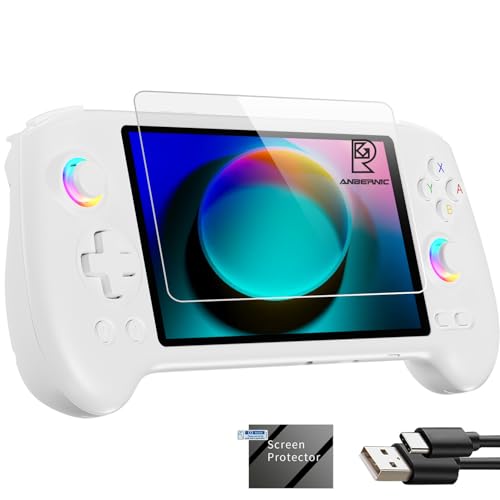
- 1.【Anbernic rg557 with high performance 8-core CPU and powerful gpu 】PLEASE NOTE that no games...
- 2.【RG557 5500mah Li-polymer battery 】Anbernic RG557 application 8 hours, RG557 amoled touch...
- 3. [rg557 supports wired screen casting (dp) and wireless screen casting] Anbernic rg557 also...
Pros
- Dimensity 8300 processor
- 5.48-inch AMOLED touchscreen
- Dual analog controls
- Hall-effect triggers
- Wi-Fi 6E and Bluetooth 5.3
Cons
- Larger than pocket-focused handhelds
- Android requires more setup than Linux devices
Trade-offs / Who should skip:
Choose a smaller Linux handheld if you mainly play older 2D systems and care more about portability and simplicity than maximum processing headroom.
Anbernic RG406V — Best for Vertical Android Gaming
The RG406V keeps the nostalgic vertical handheld shape while offering a more modern Android platform. This configuration uses Android 13, a 4-inch IPS multi-touch display, a 5500mAh battery, Wi-Fi, Bluetooth, and 1080p display output.
Its larger screen and touchscreen make it considerably more flexible than basic vertical retro handhelds.
Why it wins: It combines a classic vertical layout with Android flexibility and controls better suited to later systems.
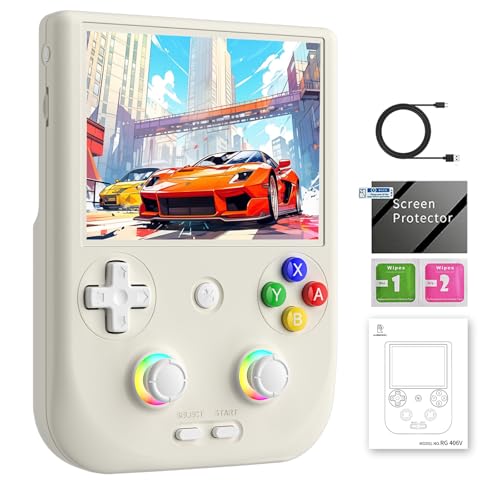
- Beautiful and ergonomic appearance: The sleek design of the RG406V is very much in line with...
- RG406V Upgrade Technology and Performance: The Anbernik RG 406V uses an Unisoc T820 processor, an...
- RG406V Unique design: The RG 406V supports streaming media, can play PC games on almost any device...
Pros
- 4-inch IPS touchscreen
- Android 13
- 5500mAh battery
- Wi-Fi and Bluetooth
- 1080p display output
Cons
- More expensive than Linux handhelds
- This listing is a no-card configuration
Trade-offs / Who should skip:
Choose a Linux model if you want a simpler, more console-like experience. The RG406V makes more sense for users willing to configure Android emulators and applications.
GoolRC 3-Inch Linux Handheld — Best for Budget Retro Gaming
The GoolRC is a compact open-source Linux handheld with a 3-inch IPS display. Its simple format is geared toward classic games and makes it a lower-cost alternative to premium Android devices.
The smaller body is particularly suited to older D-pad-focused systems rather than games that rely heavily on analog controls.
Why it wins: It offers a focused Linux retro-gaming experience at one of the lowest prices among the stronger campaign options.
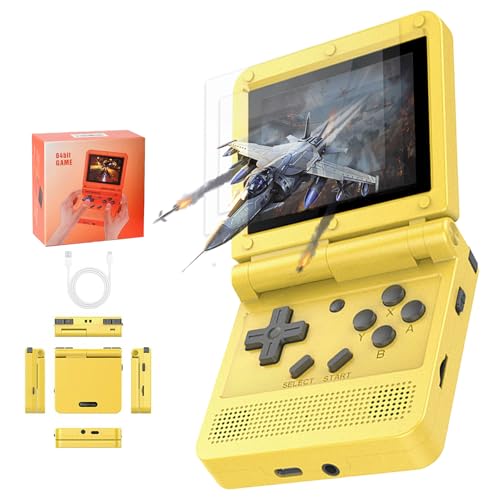
- ★ 【Video Gaming】:The GoolRC Flip Handheld Console is the ultimate handheld game console...
- ★ 【HD Screen】:Handheld Game Console Immerse yourself in stunning visuals with the 3.0 full...
- ★ 【Easy to carry】:Take your gaming anywhere with the compact size of this handheld console...
Pros
- Open-source Linux platform
- 3-inch IPS display
- Compact body
- Affordable price
- Simple retro-focused experience
Cons
- Small display
- Limited for analog-heavy games
Trade-offs / Who should skip:
Choose the RG557 or RG406V if later 3D systems and Android flexibility matter more. This model is best for inexpensive classic gaming.
Trimui Brick — Best for High-Resolution Compact Gaming
The Trimui Brick combines a small vertical body with a sharp 3.2-inch 1024×768 IPS display. It uses a Linux-based interface and provides Wi-Fi, Bluetooth, stereo speakers, a headphone jack, expandable microSD storage, and a 3000mAh battery.
Its control layout is focused on classic games rather than analog-heavy 3D titles.
Why it wins: Its unusually sharp display makes it one of the most appealing compact options for older pixel-based games.

- NOTE: Out of box to play console but NO Nin10do-games, please prepare your own games if needed.
- 1024*768 3.2-in High resolution IPS OCA LCD display 400PPI ultra clear screen
- Built-in 3000mAh Li-Po battery provides 4-5 hours life for hand-held retro games
Pros
- 1024×768 IPS display
- Compact construction
- Linux-based interface
- Wi-Fi and Bluetooth
- Expandable storage
Cons
- No analog sticks
- Small controls may be uncomfortable during long sessions
Trade-offs / Who should skip:
Skip it if analog controls are important for your favorite systems. The Brick is strongest for classic 2D libraries and early console gaming.
Powkiddy V90S — Best for Clamshell Portability
The V90S uses a folding body that protects its screen and controls when carried. It pairs a Linux-based system with a 3.5-inch 640×480 IPS display, 1GB of memory, vibration, USB-C charging, and a 3000mAh battery.
Its dual microSD slots separate system and game storage, which can simplify firmware changes and library management.
Why it wins: The folding design makes it particularly convenient for bags, travel, and everyday portable use.
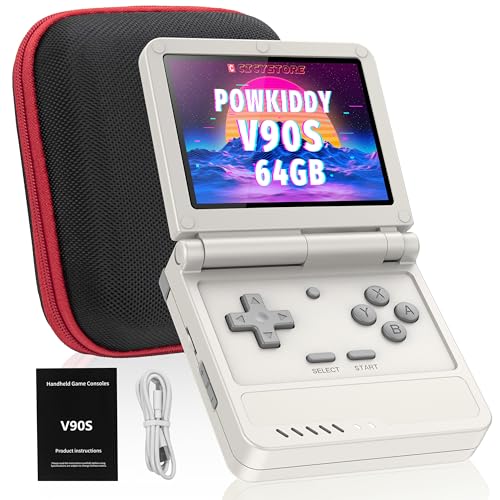
- 🎮 10,000+ Classics Preloaded Instantly play 8-bit to PSP-era gems across 20+ systems. No setup...
- 🔄 Fold & Go Anywhere Military-grade hinges survive 20K flips. Folds to pocket size (8.9x8.5cm...
- 💾 Dual TF Slots for Upgrades Separate slots for OS (system) and games – update firmware without...
Pros
- Protective clamshell design
- 3.5-inch IPS screen
- Dual microSD slots
- USB-C charging
- Linux interface
Cons
- No analog sticks
- Hinged construction adds a moving component
Trade-offs / Who should skip:
Choose a horizontal handheld if comfort during longer gaming sessions matters more than foldable portability.
Anbernic RG40XX H — Best for Horizontal Linux Gaming
The RG40XX H gives the lineup a conventional horizontal Linux handheld without moving into premium Android pricing. It uses a 4-inch IPS display and supports Wi-Fi, Bluetooth, HDMI, and TV output.
The wider body also gives the controls more room than compact vertical designs, which can make longer sessions more comfortable.
Why it wins: It combines a larger 4-inch screen, horizontal controls, Linux simplicity, and useful wireless and display-output features at a midrange price.

- 【Stunning Visuals】 Enjoy a captivating gaming experience on the 4-inch IPS full viewing angle...
- 【RG40XX H with 3200mAh Battery and Portable】The RG40XX H handheld game console is weighing only...
- 【 ANBERNIC RG40XX H with upgrade Chip】The ANBERNIC RG40XX H uses quad-core ARM Cortex-A53 and...
Pros
- 4-inch IPS screen
- Horizontal control layout
- Linux system
- Wi-Fi and Bluetooth
- HDMI and TV output support
Cons
- Less powerful than premium Android handhelds
- Larger than pocket-sized vertical devices
Trade-offs / Who should skip:
Choose the RG557 if processing performance is your top priority or the Trimui Brick if you want maximum compactness. The RG40XX H is strongest as a balanced Linux handheld for longer play sessions.
Beijue 16-Bit Handheld — Best for Kids
The Beijue is a much simpler system with 220 built-in retro-style games, a 3-inch HD screen, USB-C charging, and a manufacturer-listed runtime of more than six hours.
It lacks the flexibility of Android and Linux emulator devices, but its simplicity is useful for younger players who do not need emulator configuration or expandable game libraries.
Why it wins: A simple interface, built-in games, low price, and extensive customer history make it an easy entry point for kids.

- 220 Classic Games Kids Won't Outgrow :This kids' handheld game console is brand new design...
- 3.0 Inch HD Kids-Friendly Screen:This handheld video games console delivers vibrant visuals and...
- Ergonomic Design: This retro electronic game console boasts an ergonomic design that ensures a...
Pros
- 220 built-in games
- 3-inch display
- USB-C rechargeable
- Listed for 6+ hours of play
- Simple controls
Cons
- Fixed game library
- Much less flexible than Android or Linux handhelds
Trade-offs / Who should skip:
Enthusiasts should choose one of the configurable handhelds above. The Beijue is designed for simplicity rather than emulator customization.
Quick Compare
- Anbernic RG557: best overall performance.
- Anbernic RG406V: best vertical Android handheld.
- GoolRC 3-Inch: best budget retro handheld.
- Trimui Brick: best high-resolution compact handheld.
- Powkiddy V90S: best clamshell handheld.
- Anbernic RG40XX H: best horizontal Linux handheld.
- Beijue 16-Bit: best for kids.
Final Verdict
The Anbernic RG557 remains the strongest overall option for players who want maximum processing headroom, a large AMOLED screen, and Android flexibility.
Choose the RG406V if you prefer a vertical design without giving up touchscreen and Android features. The RG40XX H is the better middle-ground choice for users who want a horizontal layout with a simpler Linux system.
For portability, the Trimui Brick provides a sharp compact display while the Powkiddy V90S adds a protective clamshell. The GoolRC is the budget-focused Linux choice, and the Beijue is the simplest option for younger players.
As an Amazon Associate, I earn from qualifying purchases.