Affordable Gaming PCs for Smooth 1080p Gaming
As an Amazon Associate, I earn from qualifying purchases. Some links may earn us a commission at no extra cost to you.
A good affordable gaming PC should put most of the budget into the GPU, then back it up with enough RAM, a usable SSD, and a power supply that leaves some upgrade room. For most buyers, the sweet spot is smooth 1080p gaming with enough headroom for higher settings in popular titles. These picks focus on dedicated gaming desktops, not business PCs, mini PCs with integrated graphics, or gaming laptops.
1. Skytech Gaming Azure 3 RTX 5060 Ti
The Skytech Gaming Azure 3 is the best overall pick here because it steps up to an RTX 5060 Ti while still keeping the rest of the build practical. It pairs an Intel i5-14400F with 24GB of DDR5-6000 memory, a 1TB NVMe SSD, a 650W Gold PSU, Wi-Fi, and Windows 11. That makes it a strong fit for buyers who want more 1080p headroom than a basic RTX 5060 desktop.
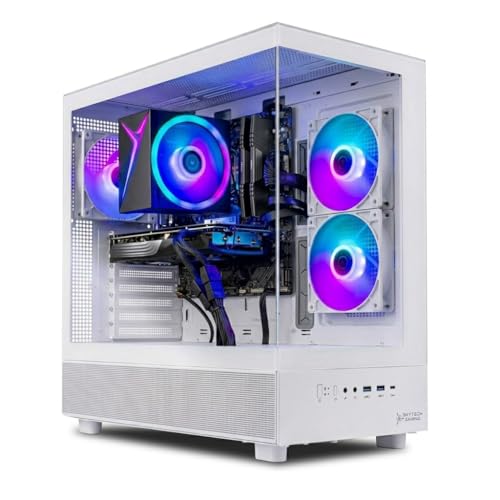
- Intel Core i5 14400F 2.5GHz (4.7GHz Turbo Boost) CPU Processor | 1TB NVMe M.2 SSD – Up to 30x...
- NVIDIA GeForce RTX 5060 Ti 8GB GDDR7 Graphics Card (Brand may vary) | 24GB DDR5 RAM 6000 Non-RGB...
- WI-FI 5 802.11ac | No Bloatware | Graphic output options include 1 x HDMI, and 1 x Display Port...

Pros
- RTX 5060 Ti gives stronger gaming headroom than standard RTX 5060 builds
- 24GB DDR5-6000 is better than the usual 16GB starter spec
- 1TB NVMe SSD and 650W Gold PSU are a solid foundation
Cons
- Costs more than entry-level RTX 5050 and RTX 5060 desktops
- Wi-Fi 5 is less impressive than Wi-Fi 6 or 6E
Who should buy it: Choose this if you want the strongest overall affordable gaming desktop from these options.
2. MSI Codex R2 A14NVL5-454US
The MSI Codex R2 remains a good pick for buyers who want a more recognizable gaming desktop line with a clean upgrade path. It combines an RTX 5060-class setup with DDR5 memory and modern connectivity, making it a good fit for 1080p gaming, esports, and general daily use.
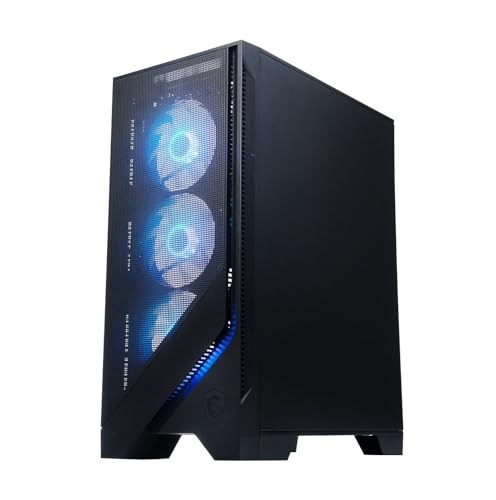
- Game without compromise: Go beyond performance with Intel Core i5 processors. Optimized with a...
- Simplistic Design: Enjoy the latest generation of Windows 11 Home for your everyday needs. *MSI...
- NVIDIA GeForce RTX 5060
Pros
- RTX 5060-class graphics are a good current budget baseline
- DDR5 memory gives it a more modern platform feel
- MSI desktop design is more upgrade-friendly than many compact OEM towers
Cons
- 16GB RAM may need an upgrade later
- Exact internal parts can vary by configuration
Who should buy it: Choose this if you want a recognizable gaming desktop with a practical upgrade path.
3. iBUYPOWER Element SE ESA7N5601
The iBUYPOWER Element SE is the best AMD CPU option in this group. Its Ryzen 7 5700 gives you 8-core value, while the RTX 5060 keeps the system relevant for 1080p gaming. The 1TB NVMe SSD is also a better starting point than cheaper builds that still ship with smaller drives.

- AMD Ryzen 7 5700, NVIDIA GeForce RTX 5060 8GB, 16GB DDR4 3200MHz 8x2 1TB NVMe SSD, WIFI Ready...
- Connectivity: 6 x USB 3.1 | 1x RJ-45 Network Ethernet 10/100/1000 | Audio: On board audio
- Special Add-Ons: Tempered Glass RGB Gaming Case | 802.11AC Wi-Fi Included | 16 Color RGB Lighting...
Pros
- Ryzen 7 5700 gives strong multi-core value
- RTX 5060 is a good match for 1080p gaming
- 1TB NVMe SSD gives enough room for several large games
Cons
- DDR4 platform is older than newer DDR5 builds
- 16GB RAM is still the practical minimum
Who should buy it: Choose this if you prefer an AMD CPU and want a balanced RTX 5060 gaming desktop.
4. Skytech Gaming Crystal RTX 5060
The Skytech Gaming Crystal is the best balanced RTX 5060 replacement pick. It uses a Ryzen 5 8400F, RTX 5060, 16GB DDR5-5200, a 1TB NVMe SSD, a 650W Gold PSU, Wi-Fi, and Windows 11. It is a good middle-ground desktop for buyers who want a current GPU and DDR5 without moving into higher-priced enthusiast builds.
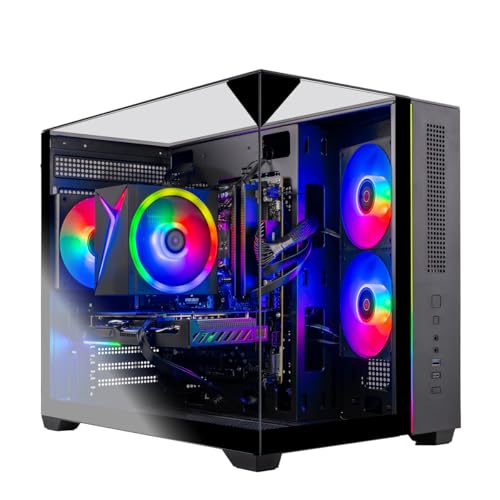
- AMD Ryzen 5 8400F 4.2GHz (4.7GHz Turbo Boost) CPU Processor | 1TB NVMe M.2 SSD – Up to 30x Faster...
- NVIDIA GeForce RTX 5060 8GB GDDR7 Graphics Card (Brand may vary) | 16GB DDR5 RAM 5200 Non-RGB Gaming...
- WI-FI 5 802.11ac | No Bloatware | Graphic output options include 1 x HDMI, and 1 x Display Port...
Pros
- RTX 5060 is a strong current 1080p gaming option
- DDR5 memory keeps the platform more modern
- 650W Gold PSU is better than many bare-minimum budget towers
Cons
- 16GB RAM is fine to start but not generous
- Ryzen 5 CPU is more budget-focused than premium
Who should buy it: Choose this if you want a balanced RTX 5060 desktop with DDR5 and a reasonable parts mix.
5. Skytech Gaming Azure 3 Ryzen 7 RTX 5060
This Skytech Gaming Azure 3 configuration is a good value pick if you want an RTX 5060 desktop with a stronger 8-core CPU. It pairs a Ryzen 7 5700 with an RTX 5060, 16GB DDR4, a 1TB NVMe SSD, a 650W Gold PSU, Wi-Fi, and Windows 11. It gives up DDR5, but the CPU and GPU pairing still makes sense for budget gaming.
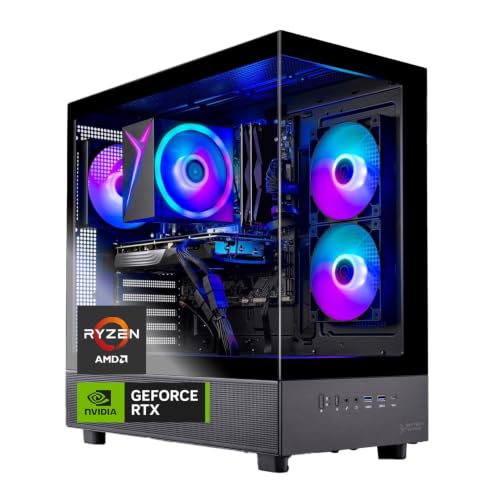
- AMD Ryzen 7 5700 3.7GHz (4.6GHz Turbo Boost) CPU Processor | 1TB NVMe M.2 SSD – Up to 30x Faster...
- NVIDIA GeForce RTX 5060 8GB GDDR7 Graphics Card (Brand may vary) | 16GB DDR4 RAM 3200 Non-RGB Gaming...
- WI-FI 5 802.11ac | No Bloatware | Graphic output options include 1 x HDMI, and 1 x Display Port...
Pros
- Ryzen 7 5700 gives good 8-core CPU value
- RTX 5060 keeps gaming performance current
- 1TB NVMe SSD and 650W Gold PSU are useful starting specs
Cons
- DDR4 memory is older than DDR5
- 16GB RAM may need upgrading for heavier multitasking
Who should buy it: Choose this if you want an RTX 5060 desktop with a stronger CPU while staying value-focused.
6. Skytech Gaming Chronos 3 RTX 5050
The Skytech Gaming Chronos 3 is the best entry-level gaming PC pick here. It uses an Intel i5-14400F, RTX 5050 8GB, 1TB NVMe SSD, 16GB DDR4, a 650W Gold PSU, Wi-Fi, and Windows 11. It is not as strong as the RTX 5060 or RTX 5060 Ti systems above, but it is a better fit for buyers who want a lower-cost gaming tower for esports, lighter AAA games, and 1080p settings tuning.
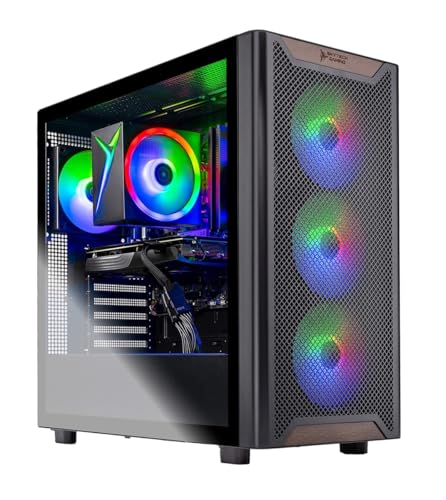
- Intel Core i5 14400F 2.5GHz (4.7GHz Turbo Boost) CPU Processor | 1TB NVMe M.2 SSD – Up to 30x...
- NVIDIA GeForce RTX 5050 8GB GDDR6 Graphics Card (Brand may vary) | 16GB DDR4 RAM 3200 Non-RGB Gaming...
- WI-FI 5 802.11ac | No Bloatware | Graphic output options include 1 x HDMI, and 1 x Display Port...
Pros
- Lower-cost route into a current dedicated-GPU gaming desktop
- Intel i5-14400F is a capable gaming CPU
- 1TB NVMe SSD and 650W Gold PSU are solid for the price class
Cons
- RTX 5050 has less gaming headroom than RTX 5060 options
- DDR4 memory is less future-looking than DDR5
Who should buy it: Choose this if you want the most budget-friendly dedicated-GPU gaming desktop in this list.
Quick Comparison
- Skytech Gaming Azure 3 RTX 5060 Ti: best overall gaming headroom.
- MSI Codex R2 A14NVL5-454US: best upgrade-friendly recognizable desktop.
- iBUYPOWER Element SE ESA7N5601: best AMD CPU option.
- Skytech Gaming Crystal RTX 5060: best balanced RTX 5060 replacement.
- Skytech Gaming Azure 3 Ryzen 7 RTX 5060: best value Ryzen 7 desktop.
- Skytech Gaming Chronos 3 RTX 5050: best entry-level dedicated-GPU pick.
Final Verdict
The Skytech Gaming Azure 3 RTX 5060 Ti is the best overall affordable gaming PC here because it offers the strongest GPU headroom, faster DDR5 memory, and a practical 1TB SSD. The MSI Codex R2 is a good upgrade-friendly alternative, while the iBUYPOWER Element SE is the best AMD CPU pick. If you want a standard RTX 5060 build, the Skytech Gaming Crystal is the cleanest balanced option, while the Ryzen 7 Azure 3 offers strong CPU value. The Skytech Chronos 3 is the best lower-cost choice if you mainly want a dedicated-GPU desktop for 1080p gaming.
As an Amazon Associate, I earn from qualifying purchases.